Shopify Integration
Multi-touch attribution for Shopify stores. Track the complete customer journey from first click to purchase.
How It Works
The Shopify integration consists of three parts:
- Theme App Extension - Client-side JavaScript that tracks visitors and stores attribution data in Shopify's cart
- Checkout Pixel - Tracks checkout events and identifies customers by email
- Webhook Receiver - Server-side endpoint that receives order webhooks and creates conversions with attribution
Attribution Flow
1. Visitor lands on store (UTM captured, visitor_id set)
2. Visitor browses pages (session tracked)
3. Visitor adds to cart (visitor_id stored in cart attributes)
4. Visitor completes checkout (email captured by pixel)
5. Shopify sends orders/paid webhook (visitor_id in payload)
6. mbuzz creates conversion with full attribution
Installation
Complete all three steps to enable full attribution tracking.
Step 1: Configure Webhooks
Webhooks notify mbuzz when orders are placed so we can record conversions.
- Go to Settings → Notifications → scroll to Webhooks
- Click Create webhook
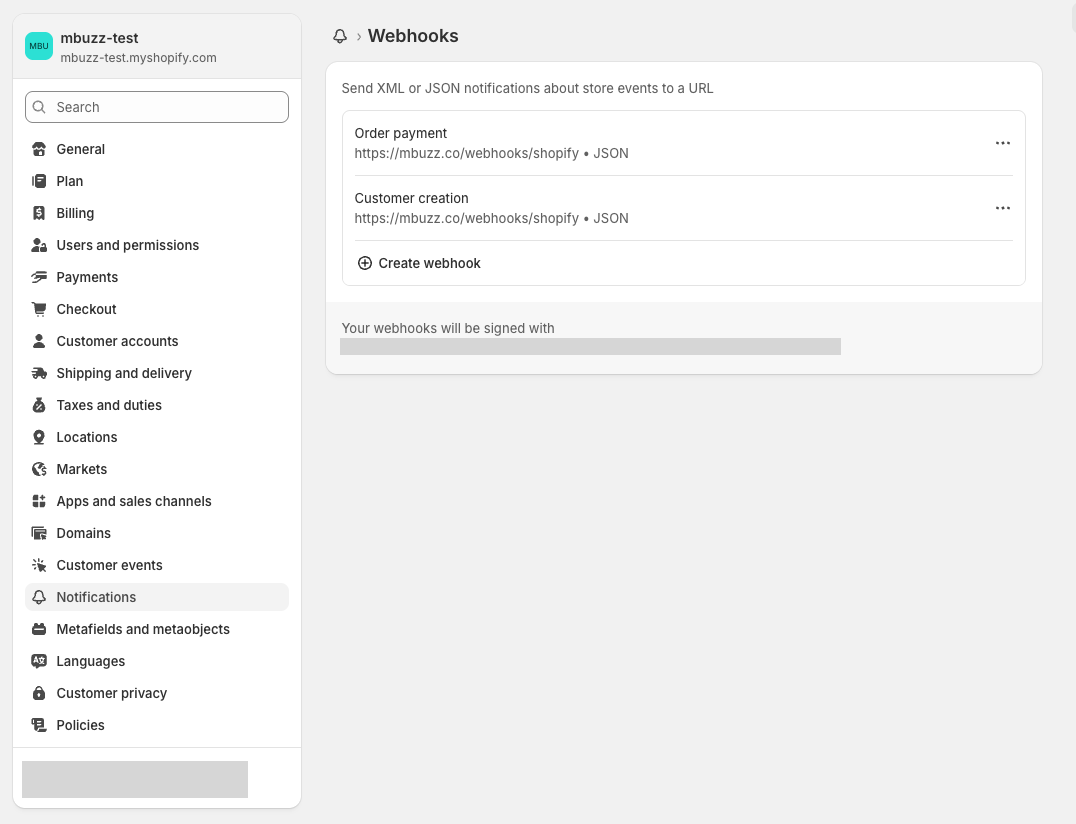
- Create the Order payment webhook:
- Event:
Order payment - Format:
JSON - URL:
https://mbuzz.co/webhooks/shopify - Click Save
- Event:
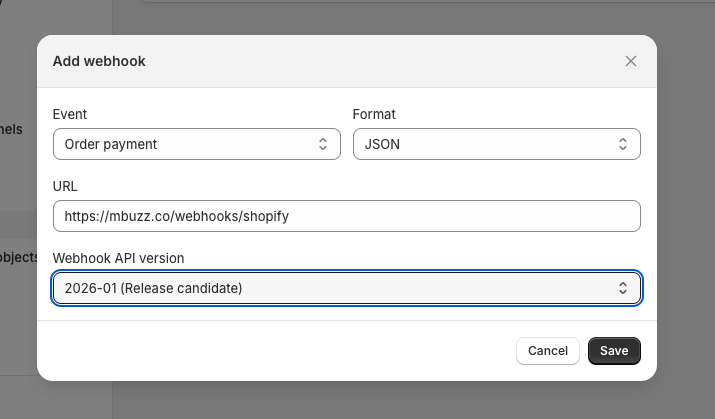
Repeat for Customer creation webhook (same URL)
Copy the webhook signing secret - you'll need this for mbuzz settings
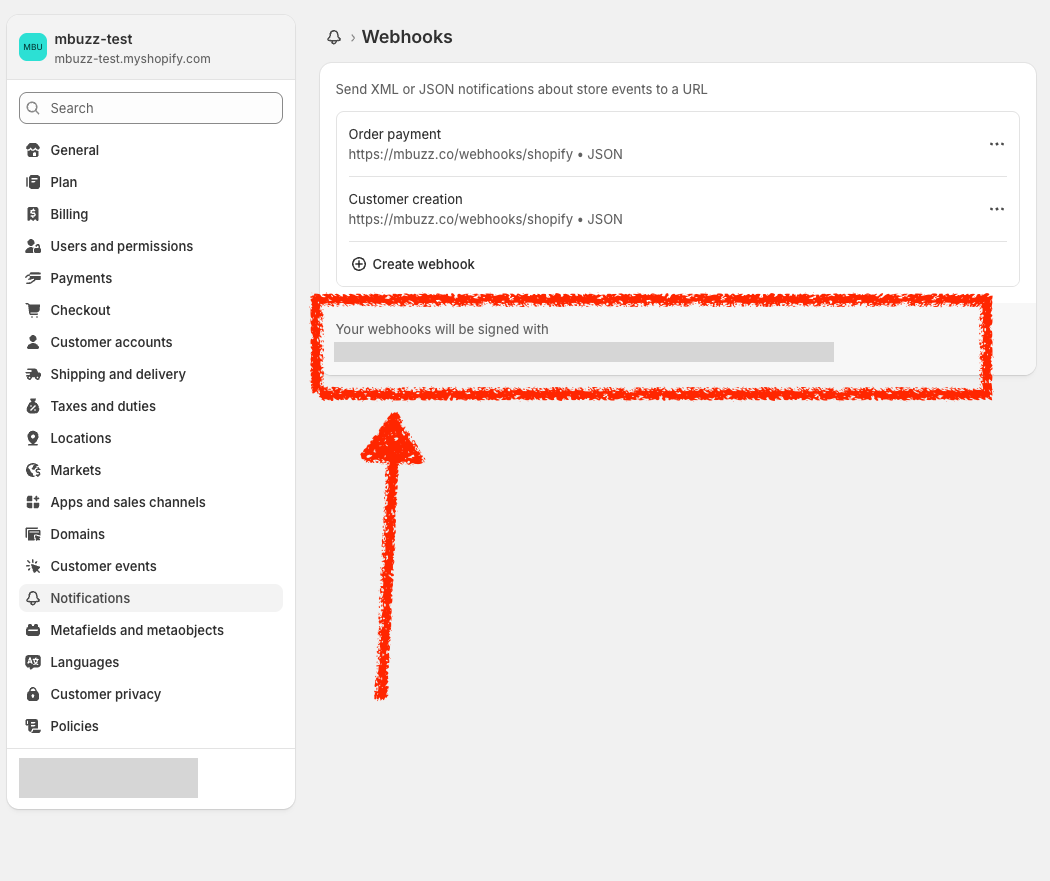
Step 2: Enable Theme Extension
The theme extension tracks visitor sessions and stores attribution data.
- Go to Online Store → Themes
- Click Edit theme on your current theme
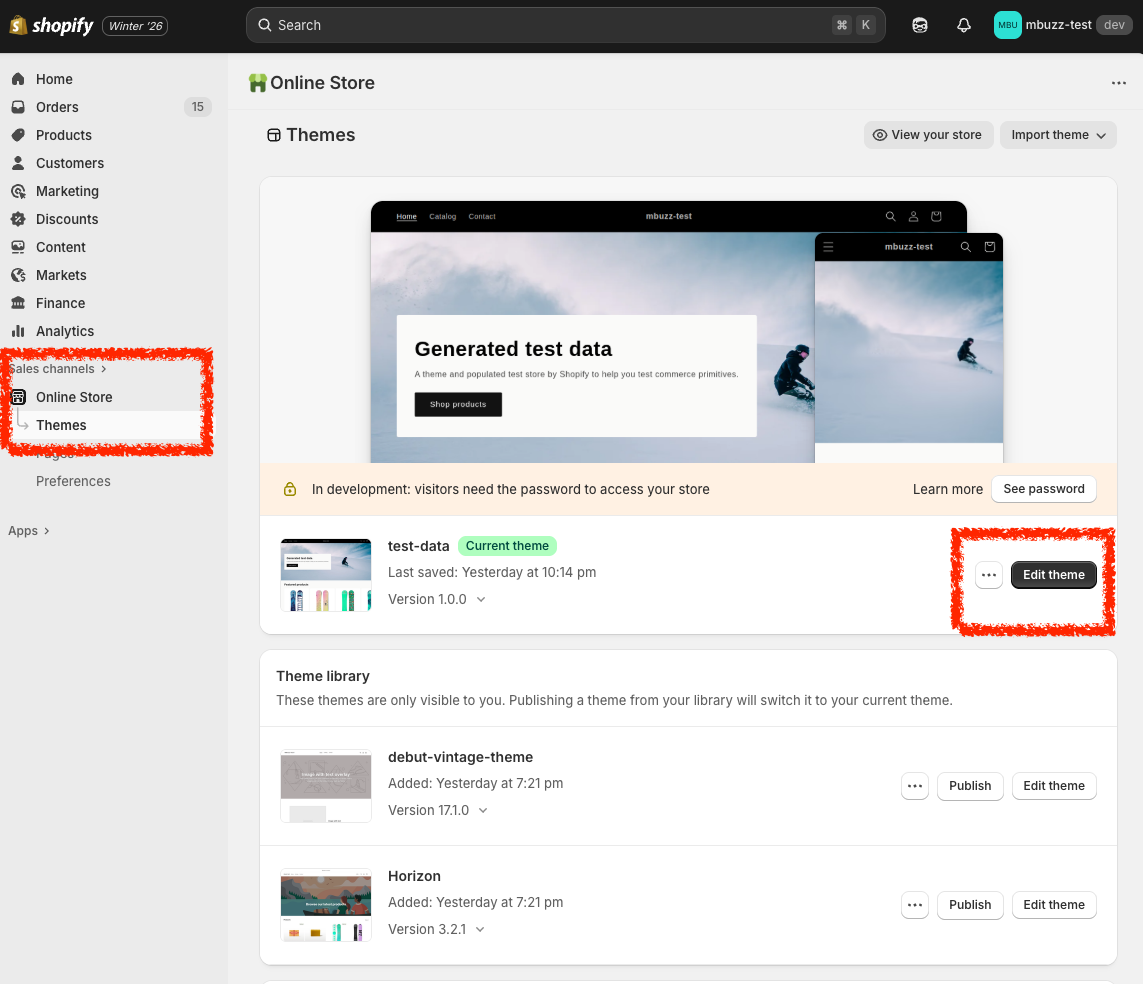
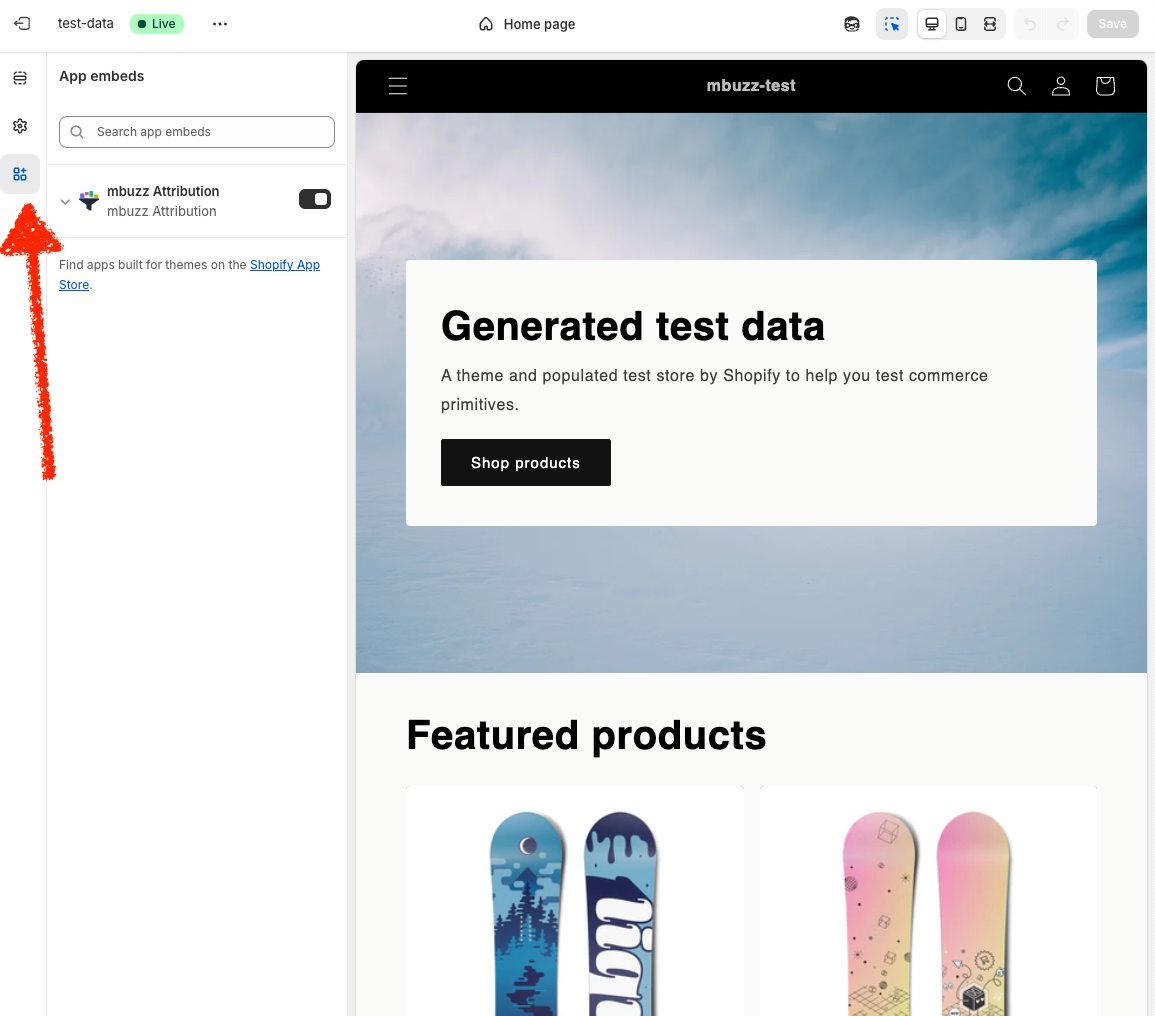
- Click the App embeds icon in the left sidebar (puzzle piece)
- Toggle on mbuzz Attribution
- Enter your mbuzz API key (from your dashboard)
- Click Save
Step 3: Add Checkout Pixel
The checkout pixel captures customer email for attribution on "Buy it Now" purchases.
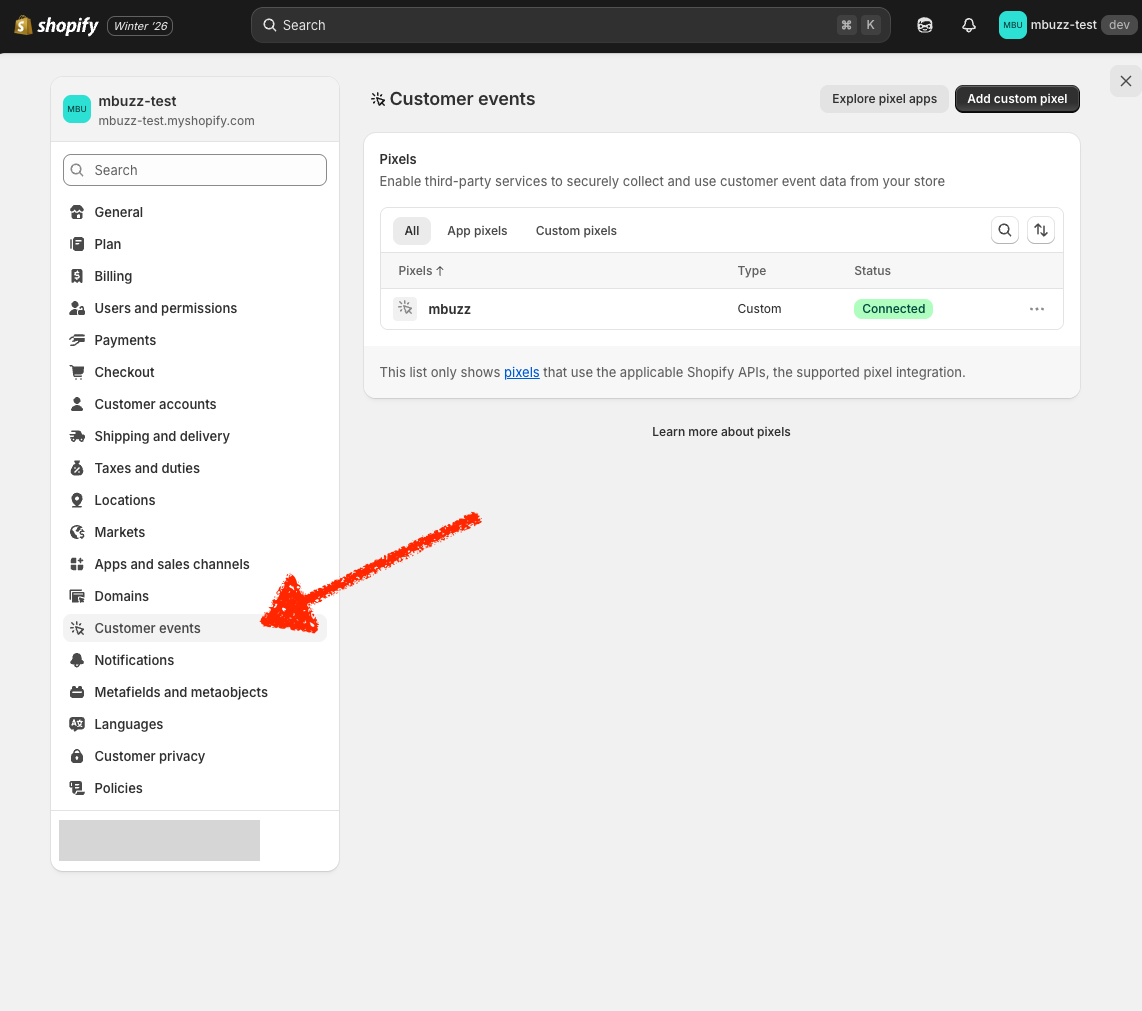
- Go to Settings → Customer events
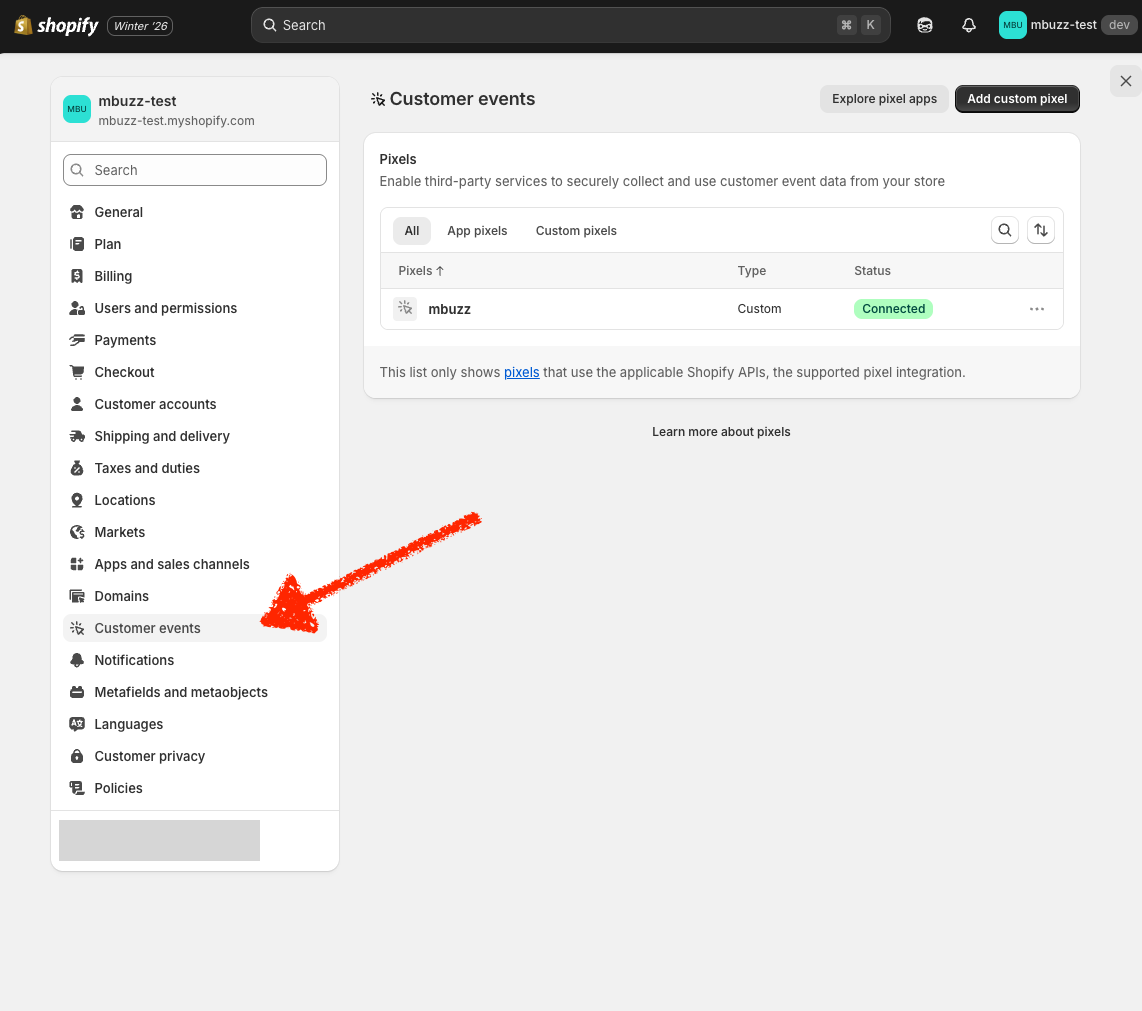
- Click Add custom pixel
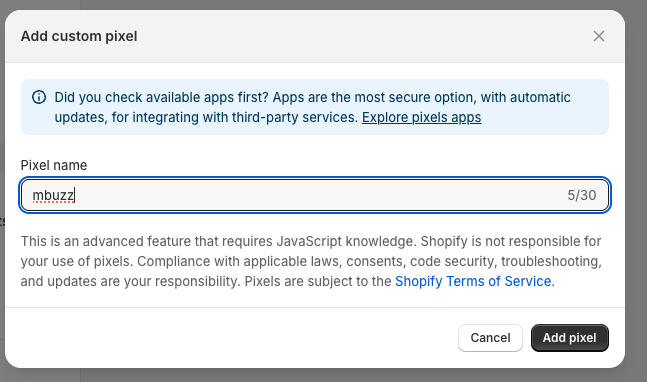
- Name it
mbuzzand click Add pixel
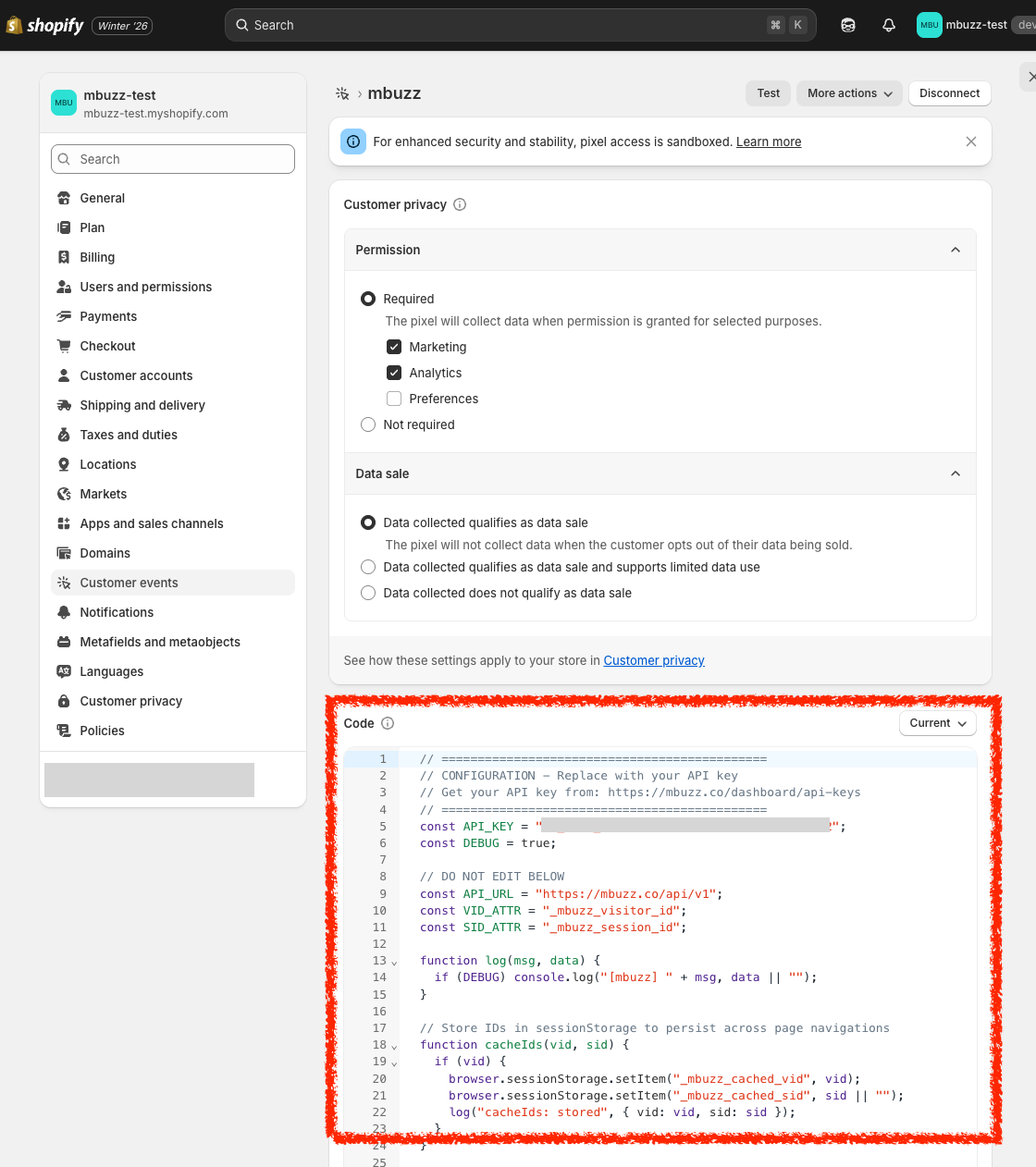
Configure permissions:
- Select Required
- Check Marketing and Analytics
Paste the pixel code (replace
YOUR_API_KEYwith your actual key):
// CONFIGURATION
const API_KEY = "YOUR_API_KEY";
const DEBUG = false;

// DO NOT EDIT BELOW
const API_URL = "https://mbuzz.co/api/v1";
const VID_ATTR = "_mbuzz_visitor_id";
const SID_ATTR = "_mbuzz_session_id";

function log(msg, data) {
  if (DEBUG) console.log("[mbuzz] " + msg, data || "");
}

function cacheIds(vid, sid) {
  if (vid) {
    browser.sessionStorage.setItem("_mbuzz_cached_vid", vid);
    browser.sessionStorage.setItem("_mbuzz_cached_sid", sid || "");
  }
}

function getIds(checkout) {
  var attrs = (checkout && checkout.attributes) || [];
  var vid = null;
  var sid = null;
  for (var i = 0; i < attrs.length; i++) {
    if (attrs[i].key === VID_ATTR) vid = attrs[i].value;
    if (attrs[i].key === SID_ATTR) sid = attrs[i].value;
  }
  if (vid) { cacheIds(vid, sid); }
  return { vid: vid, sid: sid };
}

function trackEventWithIds(ids, eventType, props) {
  if (!ids.vid) { return; }
  var payload = {
    events: [{
      event_type: eventType,
      visitor_id: ids.vid,
      session_id: ids.sid,
      timestamp: new Date().toISOString(),
      properties: props || {}
    }]
  };
  fetch(API_URL + "/events", {
    method: "POST",
    headers: { "Authorization": "Bearer " + API_KEY, "Content-Type": "application/json" },
    body: JSON.stringify(payload)
  }).catch(function(e) { log("err", e.message); });
}

function getCachedIds(callback) {
  Promise.all([
    browser.sessionStorage.getItem("_mbuzz_cached_vid"),
    browser.sessionStorage.getItem("_mbuzz_cached_sid")
  ]).then(function(results) {
    callback({ vid: results[0], sid: results[1] });
  }).catch(function() {
    callback({ vid: null, sid: null });
  });
}

function identify(checkout, email, source) {
  var ids = getIds(checkout);
  if (ids.vid) {
    sendIdentify(email, ids.vid, source);
  } else {
    getCachedIds(function(cached) {
      sendIdentify(email, cached.vid, source);
    });
  }
}

function sendIdentify(email, vid, source) {
  var payload = {
    user_id: email,
    visitor_id: vid,
    traits: { email: email, source: source }
  };
  fetch(API_URL + "/identify", {
    method: "POST",
    headers: { "Authorization": "Bearer " + API_KEY, "Content-Type": "application/json" },
    body: JSON.stringify(payload)
  }).catch(function(e) { log("err", e.message); });
}

analytics.subscribe("checkout_started", function(evt) {
  var checkout = evt.data && evt.data.checkout;
  var ids = getIds(checkout);
  if (!ids.vid) { return; }
  var items = (checkout && checkout.lineItems) || [];
  if (items.length > 0) {
    var item = items[0];
    var variant = item.variant || {};
    var product = variant.product || {};
    var price = variant.price || {};
    trackEventWithIds(ids, "add_to_cart", {
      product_id: product.id,
      product_title: item.title,
      price: price.amount,
      quantity: item.quantity
    });
  }
  var total = checkout && checkout.totalPrice || {};
  trackEventWithIds(ids, "checkout", {
    total: total.amount,
    currency: checkout && checkout.currencyCode,
    item_count: items.length
  });
});

analytics.subscribe("checkout_contact_info_submitted", function(evt) {
  var checkout = evt.data && evt.data.checkout;
  var email = checkout && checkout.email;
  if (email) identify(checkout, email, "shopify_checkout");
});

analytics.subscribe("checkout_completed", function(evt) {
  var checkout = evt.data && evt.data.checkout;
  var email = checkout && checkout.email;
  if (email) identify(checkout, email, "shopify_checkout_completed");
});
- Click Save → pixel should show as Connected
What Gets Tracked
Automatic Tracking
The Theme App Extension automatically tracks:
| Event | Trigger | Data Captured |
|---|---|---|
| Session start | Page load | UTM parameters, referrer, landing page |
| Page view | Each page | URL, timestamp |
| Add to cart | Product added | Product ID, variant, price |
| Checkout start | Begin checkout | Cart total |
Webhook Events
| Webhook | Trigger | mbuzz Action |
|---|---|---|
orders/paid |
Order completed | Create purchase conversion with attribution |
customers/create |
Account created | Link visitor to customer identity |
Visitor Identification
How Visitors Are Tracked
The integration uses a cookie to track visitors:
_mbuzz_vid- Visitor ID (2 year expiry)
Session resolution is handled server-side using device fingerprinting (IP + User-Agent) with a true 30-minute sliding window.
The visitor ID is automatically stored in Shopify's cart note_attributes, which persists through checkout and appears in webhooks.
Cross-Device Attribution
When a customer:
1. Browses on mobile (visitor A created)
2. Returns on desktop (visitor B created)
3. Creates account on desktop → identify() links visitor B
4. Logs in on mobile → identify() links visitor A
5. Purchases → Full attribution across both devices
Manual Tracking
For custom events beyond automatic tracking:
// Track custom event
mbuzz.event('viewed_pricing', { plan: 'enterprise' });

// Track custom conversion (non-purchase)
mbuzz.conversion('demo_request', { revenue: 0 });

// Manual identify (if not using Shopify customer accounts)
mbuzz.identify(customerId, { email: 'customer@example.com' });
Configuration Options
Configure the Theme Extension in your theme customizer:
| Option | Default | Description |
|---|---|---|
| API Key | (required) | Your mbuzz API key |
| Auto Track Page Views | true |
Track page views automatically |
| Auto Track Add to Cart | true |
Track add to cart events |
| Auto Identify | true |
Identify customers at checkout |
Backend Configuration
Add Shopify Domain to Account
In your mbuzz dashboard, configure:
- Shopify Domain - Your
xxx.myshopify.comdomain - Webhook Secret - From Shopify Admin → Settings → Notifications → Webhooks
The webhook secret is used to verify incoming webhooks are genuinely from Shopify.
Testing
Verify Installation
- Visit your store in an incognito window
- Open browser DevTools → Application → Cookies
- Confirm
_mbuzz_vidcookie is set
Test Webhook Flow
- Create a test order (use Shopify's test gateway)
- Check mbuzz dashboard for the conversion
- Verify attribution data matches the visitor's sessions
Troubleshooting
No Conversions Appearing
- Check webhook secret - Must match exactly (no spaces)
- Check Shopify domain - Must be your
.myshopify.comdomain - Check visitor exists - Visitor must have browsed with mbuzz cookies set
Attribution Shows "Direct" Only
- Ensure visitor landed with UTM parameters or referrer
- Check that
_mbuzz_vidcookie persisted through checkout - Verify cart attributes contain
_mbuzz_visitor_id
Webhook Not Received
- Go to Shopify Admin → Settings → Notifications → Webhooks
- Check webhook delivery logs for errors
- Verify webhook URL is
https://mbuzz.co/webhooks/shopify
Privacy & Data
Data Collected
- Visitor ID (anonymous, randomly generated)
- Session data (UTM, referrer, pages viewed)
- Order data (ID, total, customer email if provided)
Data NOT Collected
- Credit card information
- Customer passwords
- Full order line items
Cookie Consent
The mbuzz cookies are first-party and used for analytics. They may require consent under GDPR/CCPA. Consult your legal team for compliance requirements.
Known Limitations
"Buy it Now" Button
The "Buy it Now" button bypasses the cart, which means cart attributes (containing visitor_id) are not available. This is a known Shopify limitation.
Impact on attribution:
| Purchase Flow | Attribution |
|---|---|
| Add to Cart → Checkout | ✅ Full attribution |
| Buy it Now (returning customer) | ✅ Full (email lookup) |
| Buy it Now (new guest) | ❌ Limited |
For "Buy it Now" with new guests, the conversion is recorded but may not link to prior sessions.
Recommendation: If full attribution is critical, consider disabling the "Buy it Now" button in your theme settings.
Test Orders
Test orders using Shopify's Bogus Gateway do not trigger webhooks. To test the full flow:
- Create a Draft order in Shopify Admin
- Mark it as Paid
- This triggers the
orders/paidwebhook
Cross-Domain Checkout
Shopify's checkout runs on a separate domain with strict sandboxing. The checkout pixel cannot access cookies or localStorage from your storefront. This is why we use cart attributes to pass visitor data through checkout.